
one car, one visit, one card
The digital job card that runs the whole visit.
In MotoDoc, one job card holds everything about a car's visit to the workshop: what the customer said, what the technician found, what was approved, what was fitted and who did it. The advisor and the technician work on the same card, and the customer follows it from a link.
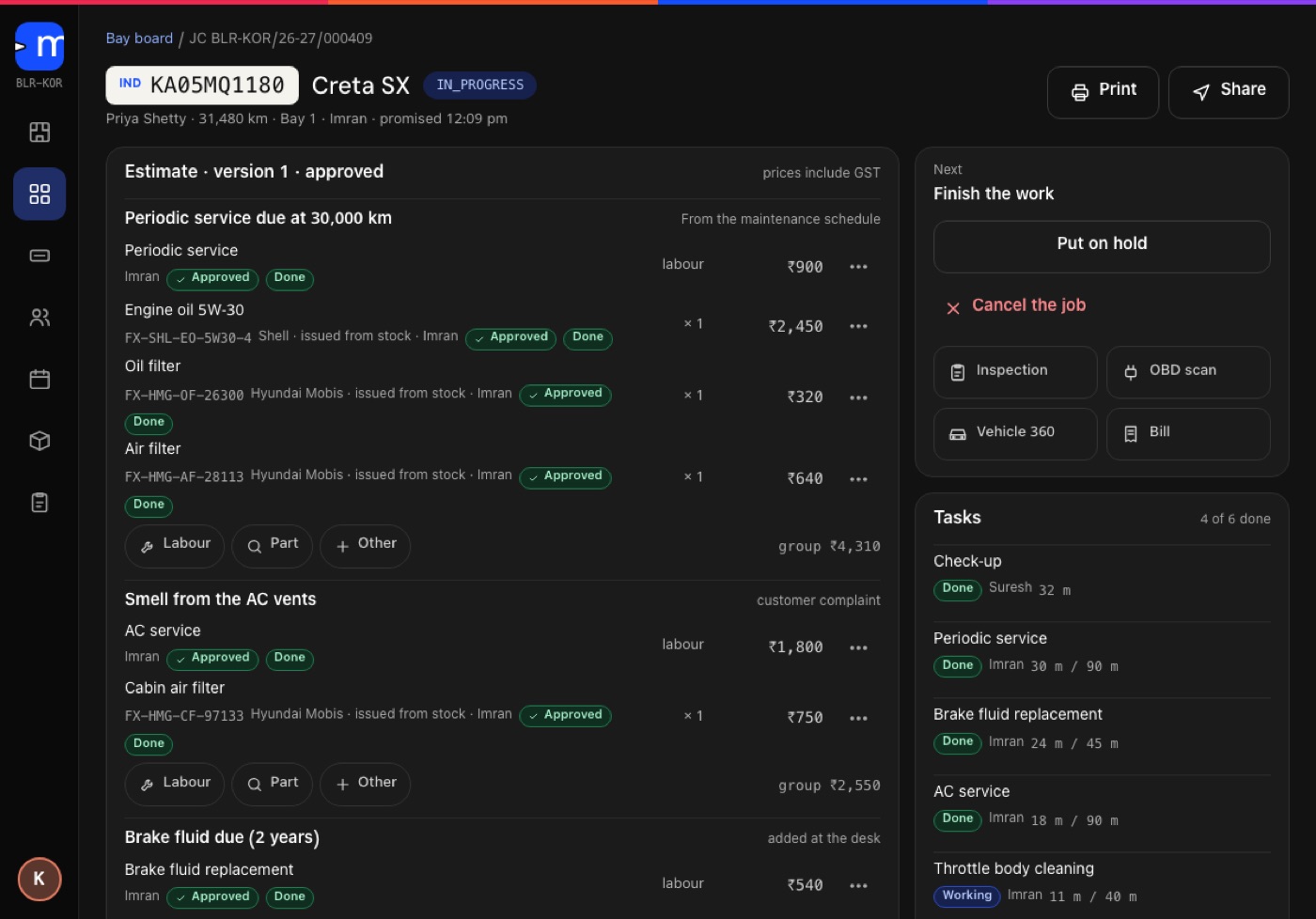
What a job card holds.
A job card opens at check-in with the number plate, the customer, the odometer reading and the promised time. From there it collects everything that happens to the car until it is delivered.
The card can be printed or shared.
- Complaints
- In the customer's own words, taken at the counter.
- Findings
- From the check-up and the OBD scan. Each is marked Urgent or Recommended and carries a photo or a reading.
- Estimate
- Grouped by reason and kept in versions, so it is clear which one the customer approved.
- Labour
- Chosen from the garage's own fixed menu.
- Parts
- Issued from stock against the job, with the part number and the brand.
- Tasks
- One per job for the technician, with the time taken next to the standard time.
Every line says why.
The estimate is grouped by the reason for the work, so the advisor can explain it and the customer can see where each amount comes from.
- From the maintenance schedule. Work that is due at this reading, such as a periodic service at 30,000 km.
- Customer complaint. Work that answers something the customer reported.
- Found in the check-up. A finding, with its photo or reading.
- Added at the desk. Work the advisor adds, such as a fluid that is due by age.
- Periodic serviceschedule
- Engine oil, oil filter, air filterschedule
- AC service, cabin filtercomplaint
- Brake fluid replacementat the desk
Prices include GST
A sample, to show how the lines are grouped.
The technician's phone is part of the card.
Each technician sees their own jobs on a phone. The work on the card is split into tasks, and the card shows the time taken next to the standard time for that job.
- My jobs. The cars assigned to that technician.
- Extra work. Anything found mid-job goes back to the customer for approval before it is done.
- Final check. A second person signs the car off before it is marked ready.
Sample tasks, as they read on the job card in the build.
Twelve statuses, check-in to closed.
A job card is always in one status. The floor board, the wall board on the workshop TV and the customer's tracking page all read from it, so nobody has to ask where a car has got to.
A job in progress can also be put on hold and picked up again.
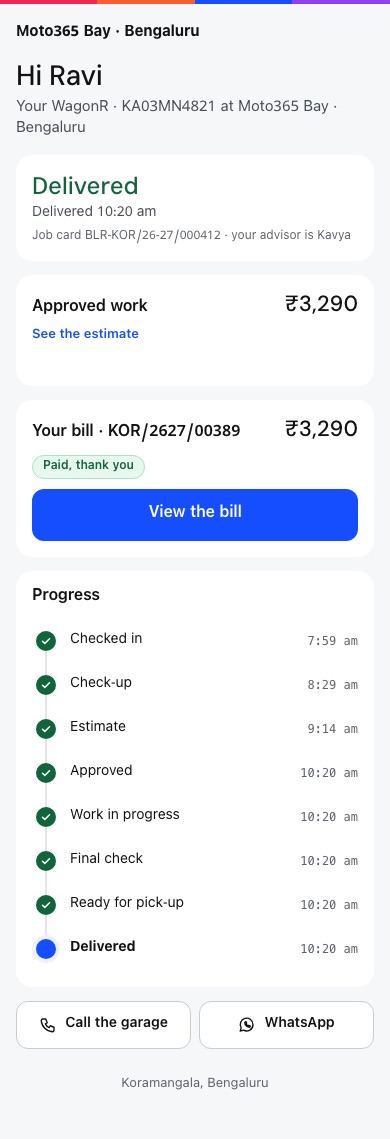
What the customer sees from the tracking link. From the MotoDoc build, with demo data.
About the job card.
What is a digital job card?
A job card is the record of one visit by one car to a workshop. A digital job card keeps that record in software instead of on paper, so the counter, the workshop floor and the customer see the same thing as it changes.
What does a MotoDoc job card hold?
The customer's complaints, the findings from the check-up and the OBD scan, the estimate and its versions, labour from the garage's menu, parts issued from stock, the technician's tasks and the status of the job.
Can the customer see the job card?
The customer gets a tracking link that needs no login. It shows how far the car has got, the work they approved and what is left to pay.
What happens when more work is found during the job?
It goes back to the customer for approval. Nothing extra is done without asking first. See estimate approval on WhatsApp.
Can a job card be printed?
Yes. It can be printed or shared from the card.
Is MotoDoc available now?
Not yet. It was unveiled on 6 February 2026 and it is in build. Garages that want to see it can ask for a walkthrough.
See a job card run from check-in to delivered.
A walkthrough takes one car through the whole card on the build. Tell us about your workshop and we will set one up.