
the floor is the garage
Every bay, every car, on one board.
MotoDoc draws the workshop as it is right now: which car is in which bay, who is working on it and what is waiting. The same picture goes on the wall TV, so the floor runs without anyone walking to the counter to ask.
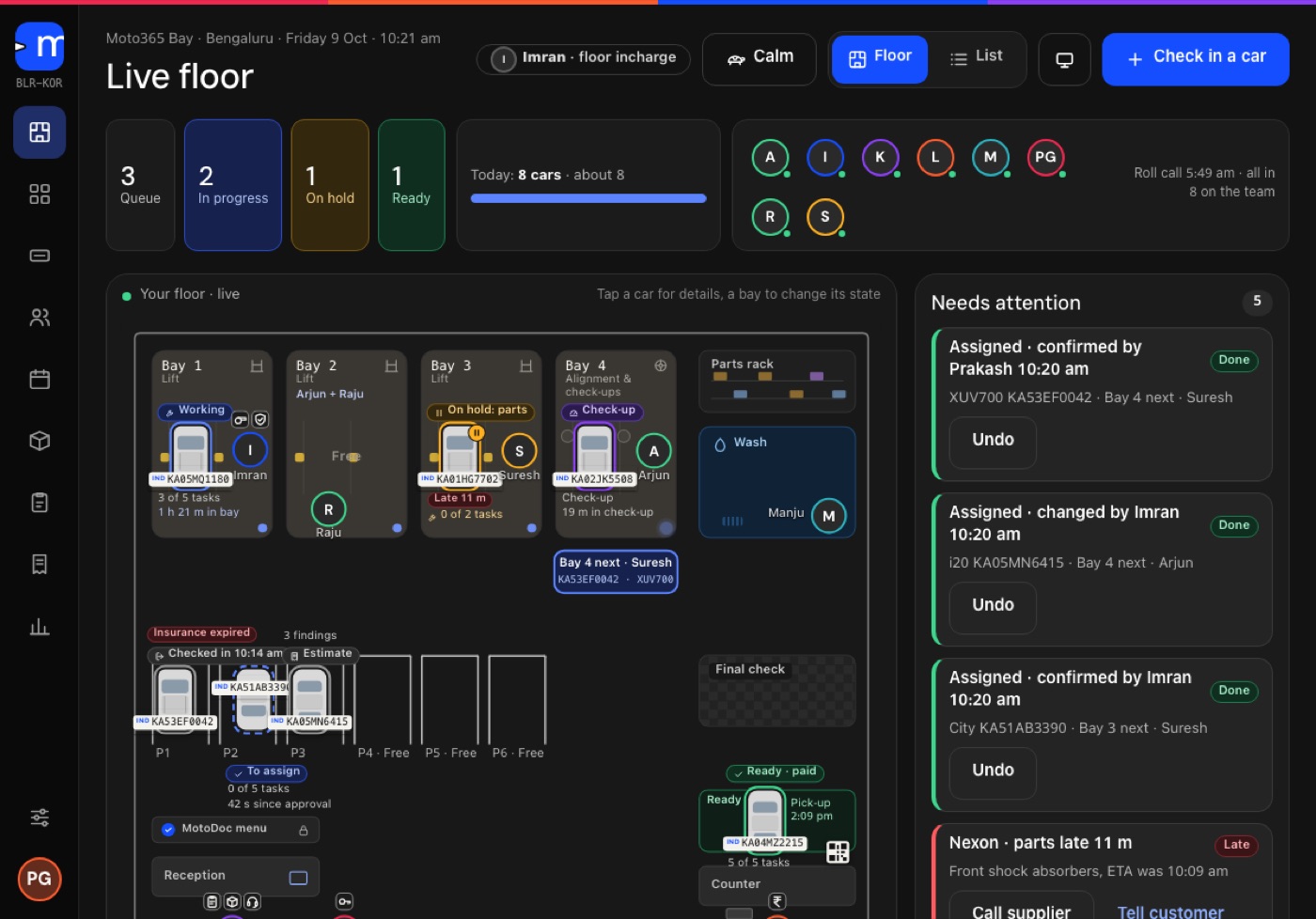
The workshop, drawn as it is.
The floor reads from the job cards. When a technician starts a task or a customer approves an estimate, the board changes by itself.
- Bays
- Each bay with its car, its technician and how far the job has got.
- Waiting areas
- Parking slots, the parts rack and the wash bay, drawn with the cars that are in them.
- Bay board
- The same cars as a list, grouped by status, for anyone who prefers a list to a picture.
- Final check
- A second person signs each car off before it shows as ready.
The jobs that are about to go wrong.
Next to the floor sits a short list of the jobs that need someone to act. The owner or the floor in-charge sees them without opening every card.
- Late parts. A job that is stuck because a part has not arrived.
- Cars on hold. Work that has been stopped and not picked up again.
- Waiting for approval. An estimate that went out and has not been answered.
MotoDoc suggests the bay. The floor in-charge decides.
When a car is ready for work, MotoDoc suggests a bay and says why. The floor in-charge confirms it or picks another. The person who knows the workshop keeps the last word.
- ApprovedThe customer approves the estimate and the job is ready to start.
- SuggestedMotoDoc proposes a bay and shows its reasons.
- ConfirmedThe floor in-charge accepts or changes it, and the car appears in that bay on the board.
A wall board with no prices and no phone numbers.
Any TV with a browser becomes the workshop's wall board. It is paired with a code and shows three views. It leaves out prices and customers' phone numbers, so it can hang where customers and visitors can see it.
- The floor. Each car, its bay and its technician.
- Promised today. The cars due out today.
- Team today. The team on the floor.
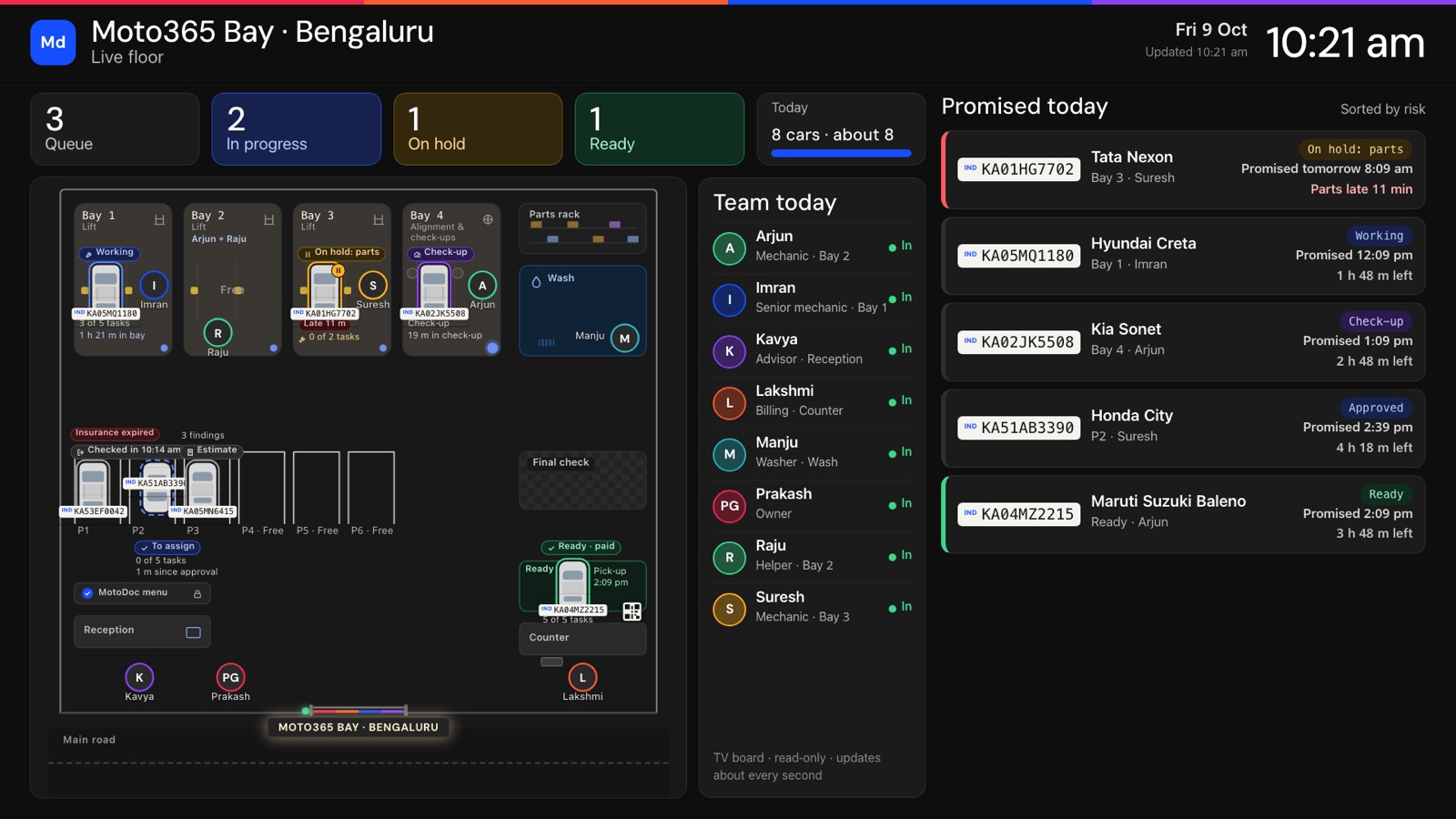
About the floor board.
What is a workshop floor board?
A live view of the workshop: which car is in which bay, who is working on it and what is waiting. In MotoDoc it updates from the job cards, so nobody has to keep a whiteboard.
Does the wall board show prices or customer details?
No. The wall board for the TV leaves out prices and phone numbers.
How do I put the board on a TV?
Open MotoDoc in the TV's browser and pair it with a code. The TV is optional.
Who decides which bay a car goes to?
MotoDoc suggests a bay with its reasons, and the floor in-charge confirms or changes it.
What counts as needing attention?
Late parts, cars on hold and jobs waiting for the customer's approval.
Is MotoDoc available now?
Not yet. It is in build. Garages that want to see it can ask for a walkthrough.
See your workshop as a live floor.
A walkthrough shows the floor, the list of jobs that need attention and the wall board on the build. Tell us about your workshop and we will set one up.