
visual proof, not opinions
A check-up the customer can see.
In MotoDoc the technician checks the car on a phone: a multi-point checklist, photos of the body and tyres, and an OBD scan. Each finding carries a photo or a reading, so the estimate that follows is built on evidence.
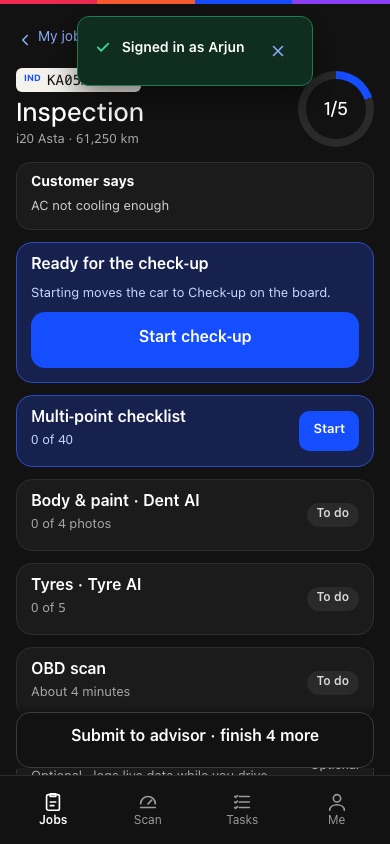
The technician's inspection screen, from the MotoDoc build. Demo data.
Forty points, one tap each.
The check-up starts with what the customer said at the counter, then takes the technician through a checklist of about forty points. Each point is answered with one tap, so it is quick enough to do on every car.
Starting the check-up moves the car along on the floor board.
- Customer says
- The complaint from check-in, at the top of the screen.
- Multi-point checklist
- About forty points, one tap each.
- Body and paint
- Four photos of the car.
- Tyres
- All five, with the depth reading.
- OBD scan
- Through a Bluetooth plug in the car's diagnostic port.
- Submit to advisor
- When every part is done, the findings go to the counter.
The AI suggests. The technician confirms.
MotoDoc reads the body photos and the tyre photos and points at what it sees. It does not decide. The technician accepts or corrects each suggestion before it becomes a finding.
- Body and paint. Dents and scratches are suggested from the photos.
- Tyres. The depth gauge is the truth. The AI is a cross-check.
- Nothing is automatic. A suggestion becomes a finding only when the technician confirms it.
Plug in. Read the car's own data.
The technician plugs a standard Bluetooth plug into the car's diagnostic port and runs the scan from the phone. MotoDoc turns the readings into health tiles and writes each finding in plain language.
What you need: Chrome on an Android phone and an ELM327 Bluetooth LE plug. Scans do not run on an iPhone or iPad.
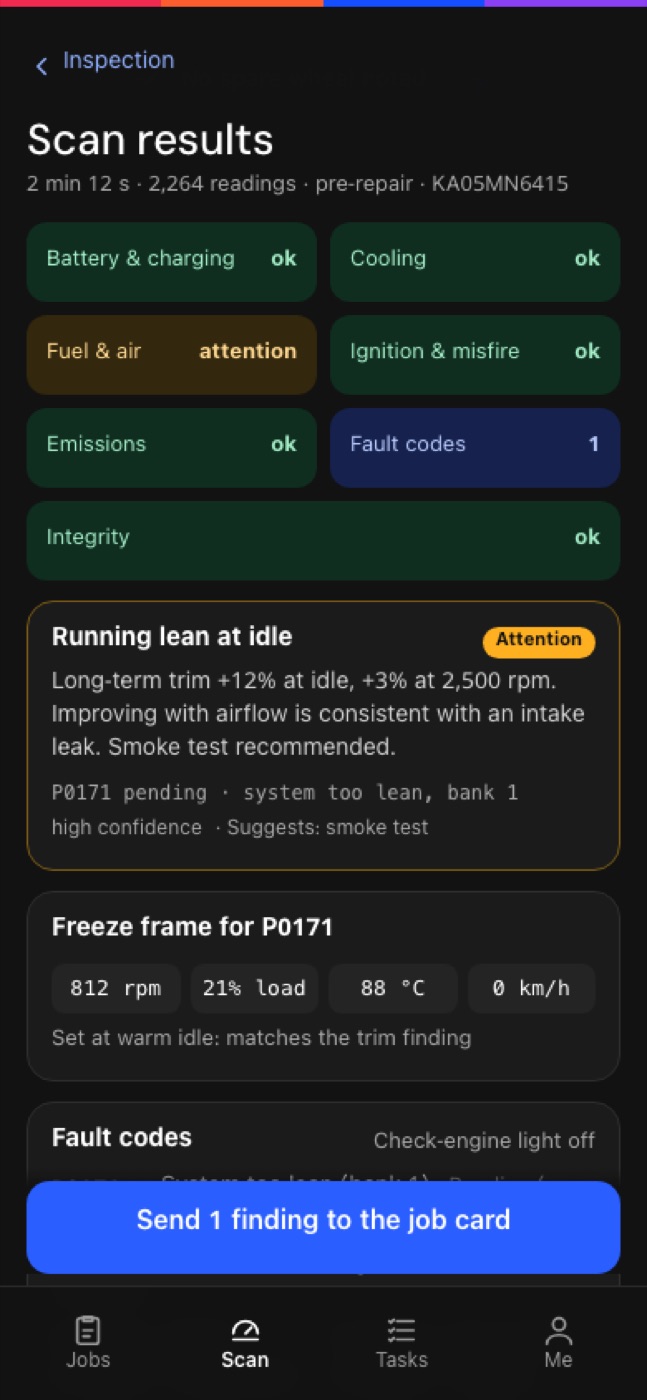
Scan results, from the MotoDoc build. Demo data.
A finding is not a note. It is a line on the card.
Each finding goes to the job card marked Urgent or Recommended, with its photo or reading. The advisor prices it, and the customer sees it on the estimate page under What we found.
- FoundIn the checklist, the photos or the scan.
- MarkedUrgent or Recommended, with the evidence attached.
- PricedBy the advisor, from the garage's labour menu and stock.
- ShownTo the customer, who approves or declines it on their phone.
About the check-up and the scan.
What is a digital vehicle check-up?
A check of the car done on a phone or tablet instead of a paper sheet. Each point is recorded, and findings carry photos or readings that the customer can see with the estimate.
What does the OBD scan read?
Battery and charging, cooling, fuel and air, ignition and misfire, emissions and fault codes. Each finding is written in plain language and goes onto the job card.
What do I need for the OBD scan?
Chrome on an Android phone and a standard ELM327 Bluetooth LE plug for the car's diagnostic port.
Does the scan work on an iPhone or iPad?
No. Scans need Chrome on Android. The rest of MotoDoc runs in the browser on a tablet, a phone, a desk computer or a TV.
Does the AI decide what is wrong with the car?
No. It suggests and the technician confirms. For tyres, the depth-gauge reading is the truth and the AI is a cross-check.
What does the customer see?
The findings, with readings where there are any, at the top of the estimate page, followed by the work the garage recommends.
Is this the same as an InspektAI inspection?
No. This is a workshop's own check-up of a car that has come in for service. InspektAI is Moto365's separate service for buyers: see independent car inspection by InspektAI.
See a check-up and a scan on a real phone.
A walkthrough runs the check-up on the build and shows the findings arriving on the job card. Tell us about your workshop and we will set one up.