
follow one car through
How a car's visit runs in MotoDoc.
A visit in MotoDoc is twelve steps on one job card, from typing the number plate at the counter to the gate pass. This page follows one car through all of them and says who does each step, and on which screen.
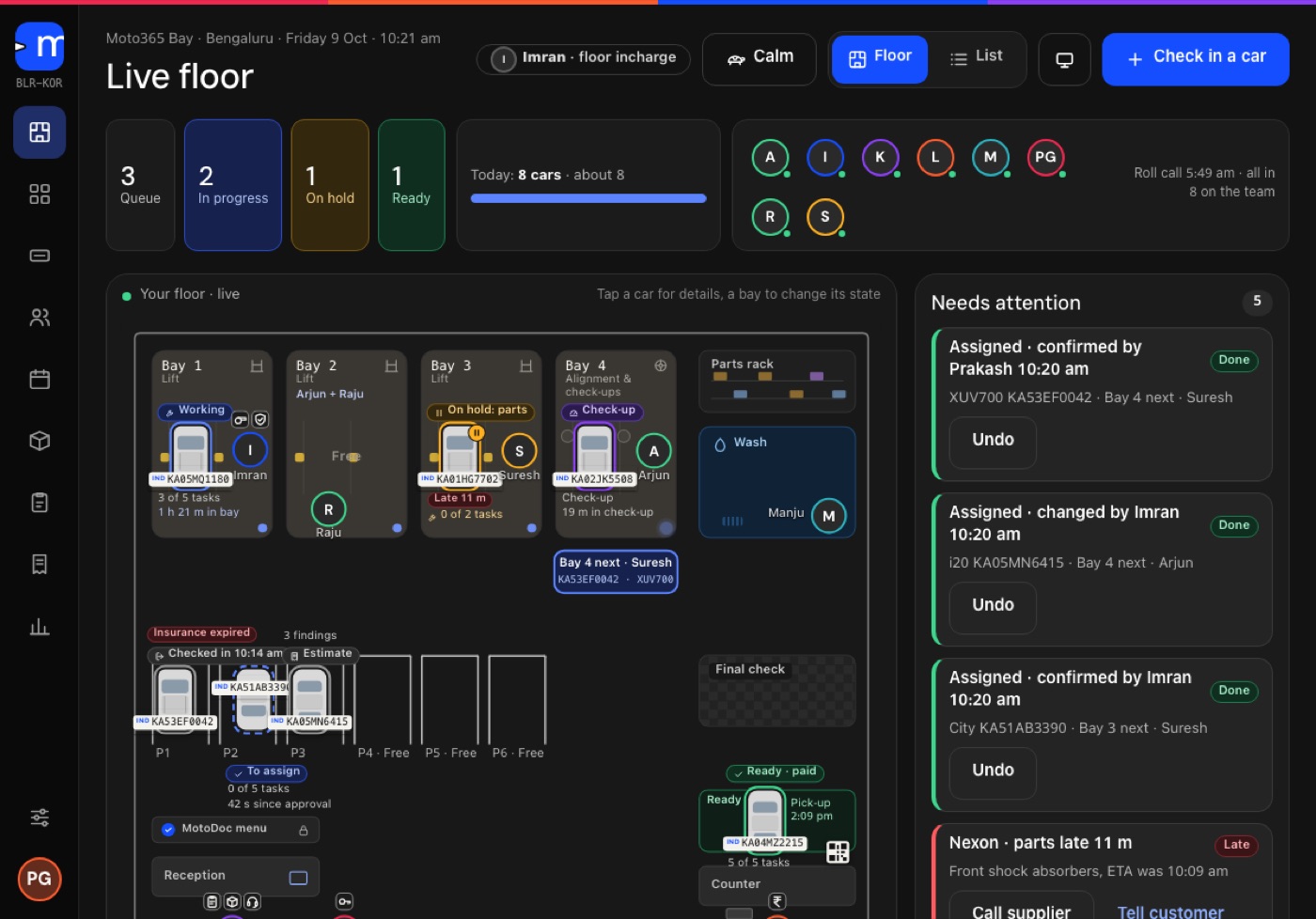
Steps 1 to 3: the car comes in.
- Type the number plateThe advisor types the plate and MotoDoc fills in the make, model, variant and fuel, with the insurance and pollution certificate dates. If the car has been here before, its past visits and declined work are on the same screen.
- Take the complaintsThe customer's phone number, the odometer reading, the complaints in the customer's own words and photos of the car as it arrived.
- Open the job cardA job card opens with a promised time. From here on, everything that happens to the car is written on this one card.
Steps 4 and 5: find out what the car needs.
- The check-upThe technician works through about forty points on a phone. Every finding carries a photo or a reading and is marked Urgent or Recommended.
- The OBD scanA standard Bluetooth plug reads battery and charging, cooling, fuel and air, ignition and misfire, emissions and fault codes. Findings go to the job card in plain language.
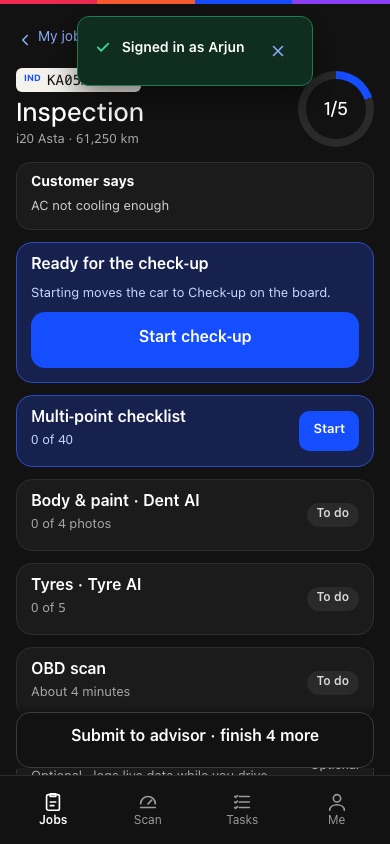
From the MotoDoc build, with demo data.
Steps 6 and 7: the customer decides.
- Build the estimateThe advisor turns findings, scheduled work and complaints into estimate lines. Each line says why it is there, and labour comes from the garage's menu.
- Send it for approvalThe estimate goes out as a link from the garage's own WhatsApp. The customer approves or declines each job, with no app and no login. Declined work is kept against the car.
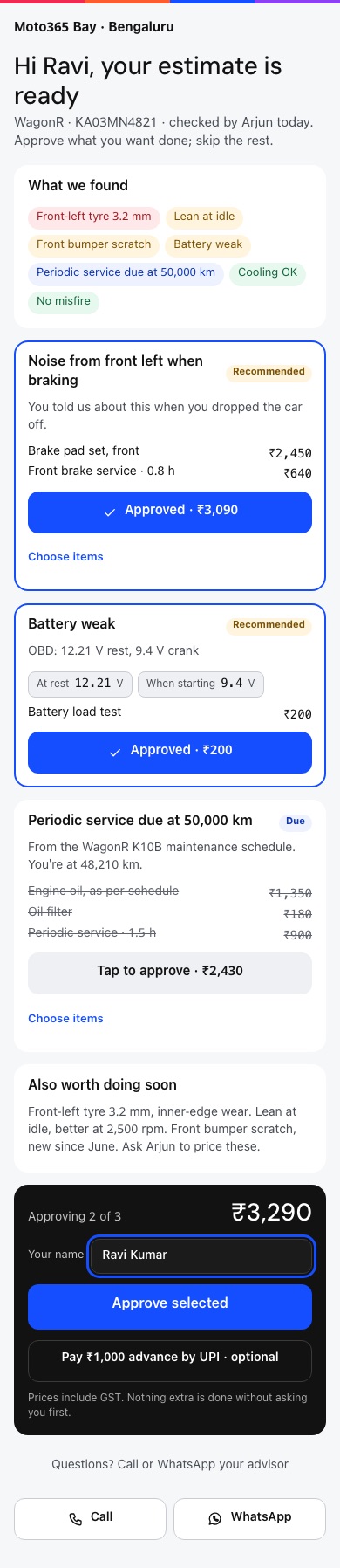
What the customer opens. From the MotoDoc build, with demo data.
Steps 8 to 10: the work gets done.
- Give it a bayMotoDoc suggests the next bay and the floor in-charge confirms it. The live floor and the wall board on the workshop TV show the car in its bay.
- Do the workThe approved work is split into tasks, timed against standard time. Parts are issued from stock against the job. Anything found mid-job goes back to the customer before it is done.
- Final checkA second person signs the car off before it is marked ready. The customer's tracking page changes to Ready.
Steps 11 and 12: bill and deliver.
- Bill and take paymentMotoDoc makes a GST tax invoice with a running number, under the garage's own logo and name, and records UPI, cash, card, bank and credit, including part payments.
- Gate pass and deliveryA release rule and a gate pass make sure a car leaves only when it should. After delivery, reminders are set for the next service and for work that was declined.
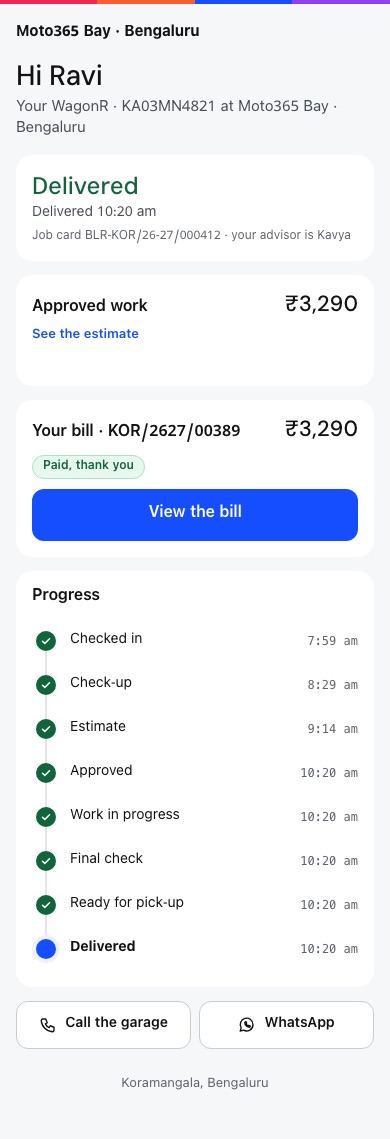
The customer's tracking page. From the MotoDoc build, with demo data.
Five roles, one card.
Staff join a workshop in MotoDoc by a link or a code, each with a role. The customer needs no account at all.
| Role | Screen | What they do in MotoDoc |
|---|---|---|
| Advisor | Tablet at the counter | Checks the car in, builds the estimate, sends it for approval, bills and delivers. |
| Technician | Phone in the bay | Sees their own jobs, runs the check-up and the OBD scan, works through timed tasks. |
| Floor in-charge | Tablet and the workshop TV | Confirms bays, watches the jobs that need attention and the final check. |
| Owner | Any screen | Sets the workshop up, reads the reports and sees what is still owed. |
| Customer | WhatsApp on their own phone | Approves or declines each job, follows the car and sees the bill. |
About how it works.
How does a car's visit run in MotoDoc?
In twelve steps on one job card: type the plate, take the complaints, open the job card, the check-up, the OBD scan, the estimate, the customer's approval, a bay, the work, a final check, the bill and payment, and the gate pass.
Who uses MotoDoc in a workshop?
The advisor on a tablet at the counter, the technician on a phone in the bay, the floor in-charge on a tablet and the workshop TV, and the owner on any screen. The customer uses a link on WhatsApp.
What happens if more work is found during the job?
It goes back to the customer for approval before it is done. Nothing extra is added without asking first.
How long does it take to set a workshop up?
Setup is a guided set of questions about the bays, the people and the billing details, and it ends with a practice job so the first real car is not the first try. MotoDoc is in build, so the best way to see setup is in a walkthrough.
Can I see this running?
Yes. A walkthrough takes one car through all twelve steps on the build. Ask for a walkthrough.
Watch one car go through all twelve.
A walkthrough takes one car through the whole job card on the build. Tell us about your workshop and we will set one up.