
nothing extra without asking first
The customer approves the estimate on their phone.
MotoDoc sends the service estimate as a link from the garage's own WhatsApp. The customer sees what was found, says yes or no to each job and watches the total follow their choices. No app. No login. No waiting for a call back.
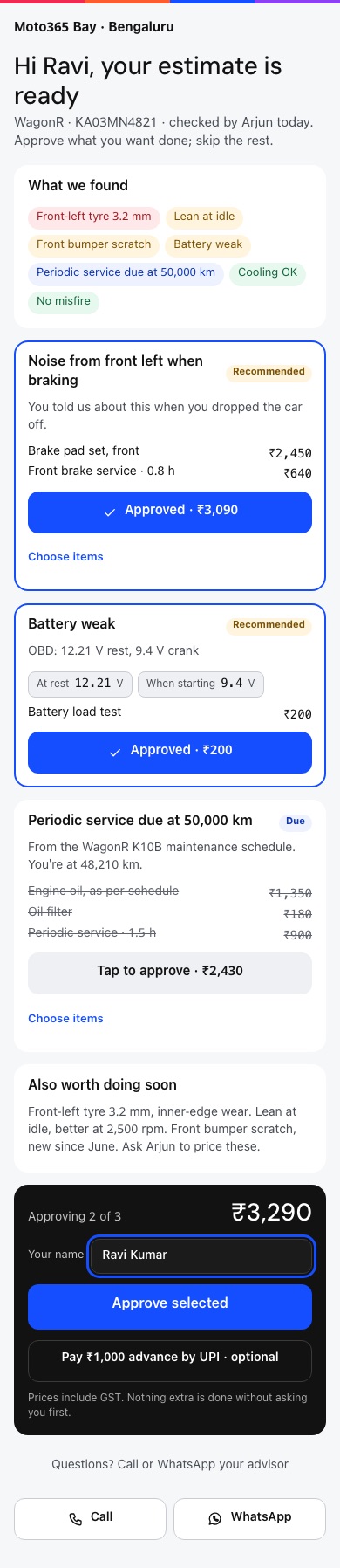
The customer's estimate page, from the MotoDoc build. Demo data. Scroll inside the phone.
It goes out from the garage's own number.
MotoDoc writes the message and the advisor sends it from the garage's own WhatsApp. The customer gets it from the garage's number, not from an unknown sender.
- No WhatsApp Business API account is needed.
- Two messages are written for you: one when the car is checked in, one when the estimate is ready.
The names in brackets are filled in from the job card.
Yes to this. Not now to that.
The link opens a page in the phone's browser. It starts with what was found, then lists the work in groups, each with its reason and its amount.
- What we found. The findings, with readings where there are any.
- A tick for each group, and for each item inside it.
- A running total that follows the ticks.
- Two buttons: Approve selected, or Decline all for now.
- Also worth doing soon: things seen on the car that are not priced yet.
The garage can also offer an advance by UPI on the same page. It is optional.
Sample figures. Try it: tick or untick a job and watch the total.
The answer lands on the job card.
What the customer approves becomes the approved estimate on the job card, and each approved job becomes a task for the technician. The workshop does not start on a guess.
- Approved
- Marked on the job card line by line, with the name the customer typed.
- More work found
- It goes back to the customer the same way. Nothing extra is done without asking first.
- Questions
- The page has buttons to call or WhatsApp the advisor.
- Prices
- Shown with GST included.
Work the customer skips is not lost.
Anything the customer declines is kept against the car. MotoDoc brings it back as a reminder, and the next visit starts from what was left undone.
- KeptDeclined work stays on the car's record, with the finding that led to it.
- RemindedThe first reminder comes 14 days after delivery.
- Seen againAt the next check-in it is on the car's own screen, with the rest of its history.
About estimate approval.
Does my customer need to install an app?
No. The estimate opens as a page in the phone's browser from a link on WhatsApp. There is no app and no login.
Do I need a WhatsApp Business API account?
No. MotoDoc writes the message and it is sent from the garage's own WhatsApp.
Can the customer approve only part of the estimate?
Yes. Each group of work, and each item inside it, can be approved or left out. The total follows the choices.
What if the customer declines everything?
The page has a Decline all for now button. The declined work is kept against the car and comes back as a reminder.
What happens when more work is found after approval?
It is sent to the customer for approval in the same way. Nothing extra is done without asking first.
Can the customer pay an advance?
The garage can offer an optional advance by UPI on the estimate page.
Is MotoDoc available now?
Not yet. It is in build. Garages that want to see it can ask for a walkthrough.
See an estimate go out and come back approved.
A walkthrough shows the estimate page working on a phone, on the build. Tell us about your workshop and we will set one up.